
Introducing Philter Router: The Right Policy for Every File
A redaction API is easy to call when you already know which policy to apply. You hand Philter a document, name a policy, and get redacted text back. That works cleanly when every document is the same shape.
Real file flows are not the same shape. An intake folder holds clinical PDFs next to signed contracts next to a CSV export from a support tool and a stray application log. Point one policy at all of them and you lose either way: a policy tuned for clinical records over-redacts a contract, and a policy tuned for support tickets under-redacts a medical intake form. The alternative, wiring up the “which policy does this file need” decision by hand in every caller, spreads that logic across your codebase and drifts the moment a new file type shows up.
Today we’re releasing Philter Router, the open source routing front door for Philter. It makes the policy decision once, in one place: hand it a file and it selects the redaction policy and the engine from the file’s attributes, then forwards the file to Philter for redaction.
What Philter Router does
Philter Router sits in front of one or more Philter engines. A file comes in; the router reads its attributes, matches it against an ordered list of routes, and forwards it to the engine and policy that route names. Philter still does the redaction; the router decides what gets applied and where.
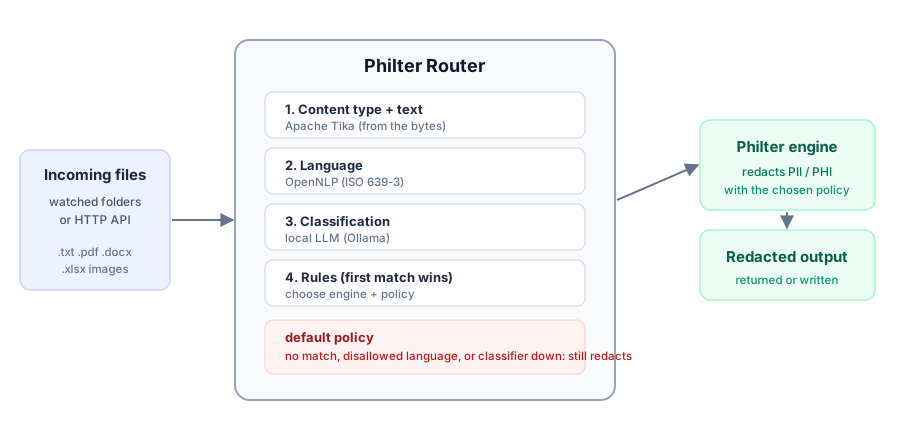
How it routes
A route matches on any combination of four attributes:
- Content type, detected with Apache Tika from the file’s actual bytes rather than its extension, so a mislabeled or extension-less file still routes correctly.
- Filename extension.
- Containing directory, so files dropped in
/legalcan take a different path than files in/intake. - A classification from a local LLM, for content that filename and directory cannot tell apart.
Routes are ordered and the first match wins. Within a route every attribute you specify must match, and a list inside one attribute is any-of, so you compose exactly the specificity you need. A route can also require a language: files outside the languages it allows fall through to the next route.
The work is tiered so the expensive parts run only when they are needed. Cheap metadata (content type, extension, directory) is checked first. Language detection and classification both need the file’s text extracted, so they run only when a route actually depends on them, and the classifier runs at most once per file with its result cached. Text extracted for routing is classification-only: it is never written as output and never logged.
The default always redacts
Every configuration must define a default route, and the router refuses to start without one. Anything that matches no route, whose language is not allowed, or whose classifier is unavailable, falls to that default, which redacts. The point is that there is no path through the router that skips redaction: a file the rules did not anticipate is still sent to a redaction policy rather than passed through untouched.
Two ways to run it
One routing pipeline drives two entry points, and you enable either or both from a single YAML file:
- A folder-watcher redacts files as they land in the directories you watch, polling for network shares or using low-latency notifications on local disks. Drop files in, collect redacted files from the output directory.
- A Philter-compatible HTTP API redacts on request. It mirrors Philter’s filter contract, so the Philter SDK and existing Philter clients work against it unchanged. The difference is that the policy is chosen by the routes rather than passed in, though you can still override it per request.
Like the rest of the toolkit, the router is self-hosted. It runs inside your own infrastructure and forwards to your own Philter engines, so files and the text extracted for routing never leave your perimeter.
Get started
Philter Router is a single Java application driven by one config file. Build the runnable jar and point it at your engines and routes:
mvn package
java -jar target/philter-router.jar router.yaml
The examples directory ships complete, commented configs (minimal, folder watching, HTTP API, classifier routing, and network shares), and every option is covered in the documentation. The code is on GitHub under the Apache License, version 2.
If your files are not uniform, your redaction does not have to pretend they are. Read each file, apply the policy built for it, and keep a default that redacts whatever you did not plan for.