
Redacting one document by opening an application and dragging a file in is fine. Doing it forty times on the last Friday of every month is how a process quietly stops happening, because the person doing it gets busy and the exports pile up in a folder nobody wants to open.
That pattern is common enough that Philter Desktop has three ways to avoid it, and none of them involve standing up a server. You can watch a folder, drive it from a command line, or right-click a file in Windows Explorer, depending on whether the work is recurring, scripted, or a one-off.
Watched folders, for work that repeats
Point Philter Desktop at a folder and it redacts new files as they land, running quietly in the system tray while it waits. The obvious use is a drop folder that some other system writes to, such as a nightly export, a scanner destination, or the place a colleague puts records when they need them scrubbed before sharing.
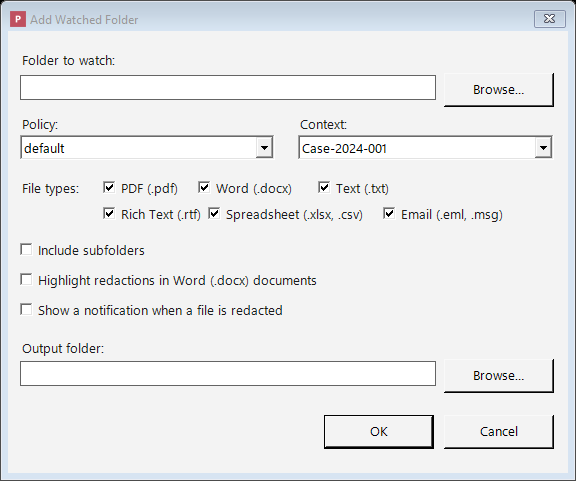
The thing to get right here is the policy, because a watched folder applies the same one to everything that arrives. If the folder receives a mix of document types with genuinely different sensitivity, either split it into two folders with two policies or accept that the policy has to be the stricter of the two. Mixed folders are where people end up surprised by what was or was not redacted.
The command line, for anything scripted
For batch jobs there is a command line, which is the right tool when the redaction step needs to sit inside something else you already run. A scheduled task that redacts yesterday’s exports before they get copied to a shared drive is the usual shape, and it keeps the whole operation on one machine with no service to monitor.
Right-click, for the file already in front of you
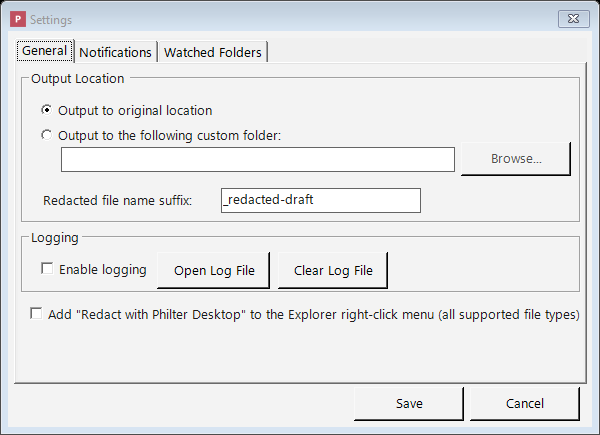
The Windows Explorer right-click action is the least interesting of the three and probably the one you will use most. When you have a folder open and a single document that needs redacting, going through the context menu is faster than switching to the application window and dragging the file across.
What automation does not change
Automating the pass does not remove the review step, and it is worth being clear about that before pointing a watched folder at anything that goes out to a third party. Detection is probabilistic, output files still land with a _redacted-draft suffix, and the suffix is doing the same job it does when you redact a file by hand. Someone has to open the results.
What automation buys you is that the first pass is always done, which is a real improvement over a manual process that gets skipped under load. A sensible arrangement is to let the watched folder produce drafts continuously and have a person review them in a batch, rather than having the same person do both jobs at the moment the documents arrive. If you need a record of what happened, the application can produce a report or a JSON explanation of every change.
There is also a point where this stops being the right tool. If the volume is high, several people need to be involved, or the redaction has to happen inside an application rather than on a workstation, then a desktop program watching a folder is the wrong shape and a self-hosted API is the right one. That is what Philter is, and the detection engine underneath it is the same one, so a policy you have tuned on the desktop is not wasted work.
If you have not installed it yet, the quick start covers the install and your first document, and the hidden difficulties of redacting PDF documents goes into what makes that format its own problem. The user guide has the detail on watched folder and command line options that this guide has deliberately kept vague, since those are the parts most likely to change between releases.