Contact Us

Tell us about your stack and the privacy problems you're trying to solve. We typically respond within one business day.

Prefer email? support@philterd.ai

Please do not enter PII or PHI in this form. If you need to share an example, use a sanitized one.

Philter Desktop

Downloading Philter Desktop

Thanks for downloading Philter Desktop!

The download should start automatically, if not click here to download.

PhilterDesktop-Setup-1.1.1.exe about 200 MB

Requires Windows 10/11

Philter Desktop is also available from the Microsoft Store.

Licensing

Using it at work

Commercial use is $100 USD per user per year. That covers business use of the official build under the Philterd Commercial License Agreement, direct support from the team that builds the toolkit, and official updates and maintenance releases through your subscription term.

For volume licensing or non-profit discounts, click below to tell us about your organization and we will provide you a pricing quote.

Using it at home

Philter Desktop is free for personal, non-commercial, and evaluation use. There is nothing to buy and nothing to sign up for.

You get the same official signed build as everyone else, with the same on-device redaction. There are no license keys and no activation to enter, and functionality is the same. Support for personal use is through the community on GitHub.

Installing Philter Desktop

Run the file you just downloaded. Setup asks three things and then it is done. Installing from the Microsoft Store skips these steps.

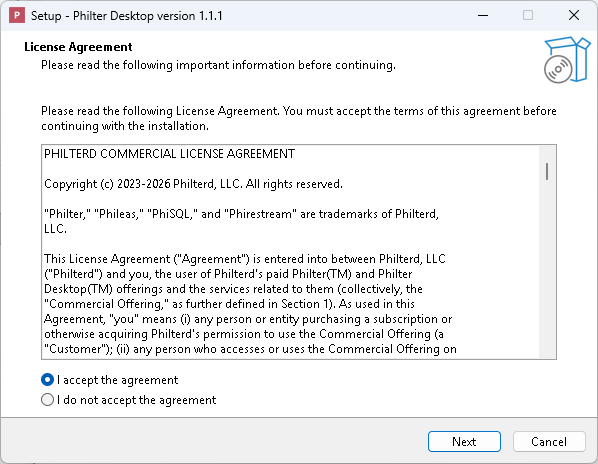
Philter Desktop Setup showing the License Agreement step, with the agreement text and the option to accept it selected
Step 1 Accept the license agreement Setup opens on the license agreement. Choose "I accept the agreement" and click Next.
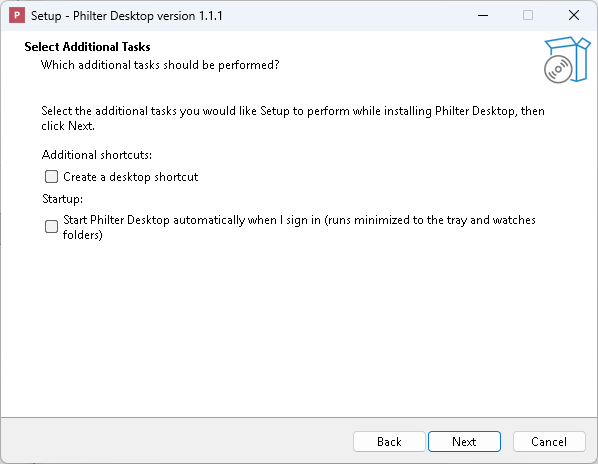
Philter Desktop Setup showing the Select Additional Tasks step, with checkboxes for a desktop shortcut and for starting at sign-in
Step 2 Pick your shortcuts Select your options, then click Next.
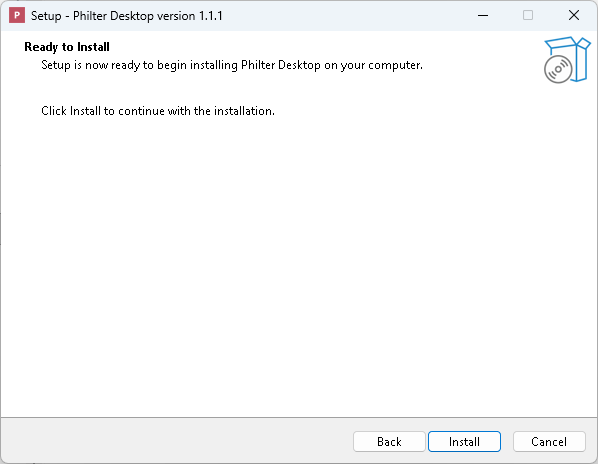
Philter Desktop Setup showing the Ready to Install step, with the Install button ready to be clicked
Step 3 Install Click Install. Setup copies the files, and Philter Desktop is ready to open.

Request a License Quote

Tell us how many people need Philter Desktop and we will send pricing. Nonprofits and volume purchases get a discount.